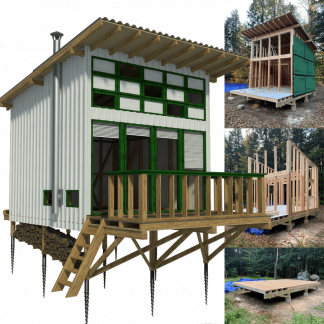
You have finally done it. You have purchased the plans for your dream cabin, a backyard studio, or a classic gable shed from Pin-Up Houses. You have the PDF files, the material list, and the enthusiasm. You can already smell the sawdust.

But there is one nagging question that 2D blueprints can’t answer: What will it actually look like on my property?
Will that “Barn Red” siding look rustic and charming, or will it look like a plastic toy against the backdrop of your pine trees? Will a metal roof glare too much in the sun? Until recently, answering these questions required expensive architectural rendering software or a leap of faith (and a lot of expensive paint).
In 2026, the game has changed. Builders and DIYers are no longer flying blind. Learning how to use AI for exterior home design is becoming just as essential a skill as reading a tape measure. It allows you to prototype your building’s finish before you buy a single plank of wood.
This guide will walk you through the process of using Artificial Intelligence to visualize your build, saving you money on materials and ensuring your DIY project looks exactly how you imagined it-or better.
The Builder’s Dilemma: Why 2D Plans Are Not Enough
Architectural plans are the DNA of your building. They tell you where the studs go, the pitch of the roof, and the dimensions of the foundation. But they are technical documents, not visual ones.
When you look at a wireframe elevation of a tiny house, your brain tries to fill in the gaps. You imagine the texture of the wood, the play of light on the porch, and the color of the trim. The problem is that our imagination is often optimistic and ignores context.
The Cost of “Visual Guessing”
In the world of DIY construction, changing your mind is expensive.
- Material Mismatch: Ordering 500 sq. ft. of vinyl siding only to realize it looks cheap next to your natural stone foundation is a costly mistake.
- HOA/Permit Rejections: Sometimes you need to show a visual representation of the finished structure to a local council or Homeowners Association to get approval. A black-and-white blueprint might not be enough.
- Site Integration: A design that looks great in a catalog might clash with the specific vegetation or terrain of your building site.
This is where ai home exterior design tools bridge the gap. They act as a “digital test site,” allowing you to try on infinite combinations of materials and colors without the mess.
From SketchUp to Reality: The New AI Workflow
For years, the gold standard for DIY visualization was SketchUp. Many Pin-Up Houses enthusiasts use it to model the frame. But let’s be honest: rendering a SketchUp model to look photorealistic requires hours of tweaking lighting settings and downloading texture packs.
Generative AI flips this workflow. Instead of manually applying textures, you simply show the AI the geometry (a screenshot of your SketchUp model, or even a simple hand sketch) and describe the look you want.
How It Works Under the Hood
Modern AI tools use a technology called ControlNet and Depth Estimation. They look at the lines of your house plan and understand: “This is a roof,” “This is a wall,” “This is a window.” Then, they use a diffusion model to “paint” realistic materials over those areas based on your text prompts.
It respects the perspective and lighting of your original image, meaning the shadows fall correctly, and the wood grain follows the direction of the siding.
Accessible Tools: Why You Don’t Need a Renderer
There is a misconception that AI design tools are only for big architecture firms with powerful servers. In reality, the best tools for DIYers are now browser-based and incredibly accessible.
You don’t need to learn complex prompt engineering or install Python scripts. Platforms offering AI home exterior design free capabilities have democratized visualization. For example, tools like Paintit.ai allow you to upload a photo of your construction site or a screenshot of your building plan and instantly visualize different finishes. This aligns perfectly with the DIY philosophy: efficient, effective, and low-cost.
By using a free AI exterior home design tool, you treat the visualization phase just like site preparation-a necessary step to ensure the structural and aesthetic integrity of the project.
Step-by-Step: How to Use AI for Exterior Home Design
Ready to visualize your Pin-Up House? Here is a practical workflow to get the best results.
Step 1: Prepare Your Input Image
The AI needs a reference. You have two options:
- The “In-Situ” Photo: Go to your building site. Take a photo of the empty ground where the house will stand. You can later ask the AI to “place” a structure there (though this is advanced).
- The Model Screenshot (Recommended): Open your building plan (PDF or SketchUp). Take a clean screenshot of the exterior elevation.
- Pro Tip: Ensure the background is simple (white or grey) if you want to swap it later, or include the landscape if you want to see how it blends in.
Step 2: Define Your Materials (The Prompt)
When you type your prompt, think like a contractor ordering materials. Be specific.
- Vague: “Nice wooden house.”
- Specific: “Tiny house cabin, vertical cedar siding with natural finish, matte black corrugated metal roof, wooden deck, forest background, soft morning light.”
Step 3: Iterate on Finishes
Run the generation multiple times. Change one variable at a time.
- Run A: Cedar siding + Metal roof.
- Run B: Painted plywood siding (Blue) + Shingle roof.
- Run C: Shou Sugi Ban (charred wood) + Copper accents.
This allows you to create a “digital mood board” that you can share with your partner or family to make the final decision.
Material Selection: Testing Siding & Roofing Virtually
One of the biggest advantages of free ai exterior home design software is the ability to test materials that are popular in the tiny house community but hard to visualize.
Wood vs. Composite vs. Metal
Many Pin-Up Houses designs (like the Cheryl or Dolores cabins) are versatile.
- Timber Cladding: Looks classic, but how will it age? Ask the AI for “weathered pine siding” to see how the house might look in 5 years.
- OSB/Plywood: If you are on a tight budget, you might use painted OSB. Ask the AI to render “painted board and batten, dark green” to see if you can achieve a premium look with budget materials.
- Corrugated Metal: A popular choice for modern sheds. However, it can look industrial. Use AI to test “galvanized steel siding” vs “matte black metal siding” to see which blends better with your garden.
Roofing Visuals
The roof can account for 30-40% of the visible exterior of a small cabin.
- Shingles: Classic, textured.
- Standing Seam Metal: Modern, sleek, vertical lines.
- Green Roof: Some eco-builders want a living roof. AI can visualize “grass roof with wildflowers” to help you decide if the extra structural reinforcement is worth the aesthetic payoff.
Color Psychology for Small Structures
Designing a tiny house or a shed is different from designing a mansion. A small structure needs to assert its presence or disappear into nature. AI home exterior design helps you find that balance.
The “Disappearing” Cabin
If you are building in a dense forest, you might want the cabin to blend in.
- Prompt to try: “Camouflage cabin, dark olive green exterior, natural wood trim, surrounded by ferns.”
- See how dark colors (Black, Charcoal, Forest Green) make the structure recede visually, making the interior feel like a hidden hideaway.
The “Statement” Shed
If you are building a garden office or a “She Shed” in a suburban backyard, you might want a focal point.
- Prompt to try: “Scandinavian garden office, bright red ochre paint, white window frames, sunny garden setting.”
- Bright colors on small structures create a “jewel box” effect. AI lets you test bold colors (Yellow, Teal, Red) without the risk of your neighbors complaining about an eyesore.
Integrating AI with Construction Plans
How does this fit into the actual build process with Pin-Up Houses plans?
- Before Buying Materials: Use the AI renders to calculate your “Aesthetics Budget.” If you fall in love with the stone veneer look generated by the AI, you can price it out locally. If it’s too expensive, regenerate with “faux stone siding” to see if the compromise is acceptable.
- During Construction: Print out your favorite AI render and pin it up on the job site. It serves as a “North Star” for you and anyone helping you. When you are tired and covered in dust, seeing the vision of the finished home keeps you motivated.
- For Resale: If you are building a spec tiny house to sell, you can use high-quality AI renders in your listing before the house is even finished. This helps generate interest and pre-sales.
Avoiding Common “Hallucination” Traps
While AI is powerful, it is not a structural engineer. When learning how to use ai for exterior home design, keep these limitations in mind:
- Structural Integrity: The AI might generate a window in a corner where your plan has a load-bearing post. Always default to your Pin-Up Houses blueprints for structural facts. The AI is for skin, not bones.
- Material Availability: The AI might invent a beautiful “iridescent blue wood.” It doesn’t exist at Home Depot. Always cross-reference your AI generation with local supplier catalogs.
- Scale: Sometimes AI can make a tiny house look like a mansion by shrinking the door. Ensure the proportions in your prompt (e.g., “small cabin”) keep the scale realistic.
Future Trends 2026: AR on the Job Site
Looking ahead, the integration of AI and construction is moving toward Augmented Reality (AR). By late 2026, we expect to see tools where you can hold up your phone to the wooden frame of your shed, and the AI will overlay the siding and roof in real-time video.
However, for now, the static visualization provided by web-based AI tools is the most reliable way to plan. It combines the precision of your PDF plans with the limitless creativity of generative models.
Summary
Building a house with your own hands is one of the most rewarding things you can do. It is a journey of problem-solving, physical effort, and creativity. By integrating AI home exterior design into your toolkit, you remove the visual uncertainty from the equation.
You no longer have to hope that the paint color looks good. You can know. You don’t have to guess if the metal roof fits the vibe. You can see it.
So, take your Pin-Up Houses plans, fire up a free AI tool like Paintit.ai, and start experimenting. Test the bold ideas. Try the expensive materials virtually. Make your mistakes on the screen, so you don’t make them on the site. Because when the sawdust settles, you deserve a home that looks exactly like your dream.